What makes this file tricky
A sonar log stores coordinates and depth in the binary ping headers. The converter reads the usable pairs and checks the matching index when available.
Open a Humminbird B001 recording and save each usable GPS and depth reading as a CSV for mapping.
Free preview US$9 per recording export
Files stay on your device. No account needed.
SON / IDXInput format
CSVOutput format
Local processingFiles stay in your browser
A sonar log stores coordinates and depth in the binary ping headers. The converter reads the usable pairs and checks the matching index when available.
Reads the B001 down-scan channel from supported Humminbird recordings up to 128 MB. CSV carries recorded depth estimates and elapsed time.
Open one recording ZIP, or select B001.SON with its matching B001.IDX if available.
Check coordinates, depths and the number of usable pings in the preview.
Save the CSV and open longitude and latitude as X and Y in your mapping software.
Try a sample or open your own files. The preview runs in this browser.
Choose a file or try the sample to see the result here.
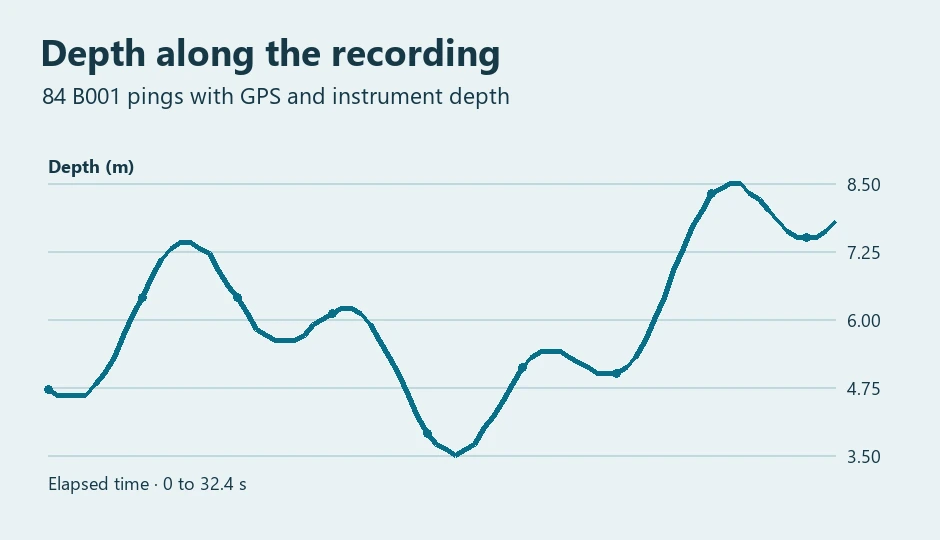
The sample produces 84 rows with GPS, depth and elapsed milliseconds. An independent Humminbird recording with 1,727 pings also converted successfully.
| Tool | What it does |
|---|---|
| SonarDepth CSV | The sample produces 84 rows with GPS, depth and elapsed milliseconds. An independent Humminbird recording with 1,727 pings also converted successfully. |
| PINGVerter | Export sonar metadata through a Python workflow. |
| ReefMaster 2.0 | Paid desktop software for sonar and map projects. |
The links describe each alternative's documented workflow.
$0
Open a sample or your own files and inspect the result before deciding whether to export.
US$9 per recording export
Pay once to download the full result shown in your preview.
Already paid? Restore your purchase.
Use one recording ZIP or the B001.SON channel. Include its B001.IDX file to verify the timing and offsets.
The output is the point data. Import the CSV into your mapping or spreadsheet application to create a map.
The exported depth comes from the instrument. Tide, sound-speed and other survey corrections should be applied separately.
The preview counts omitted points. Only usable pairs appear in the export.
The preview is free. Each recording export is US$9, charged once at download.
Your files are processed in your browser. Stripe handles checkout separately.
No account is needed. Complete Stripe Checkout and return to this browser to download the result.
Open this tool in the same browser and select Restore purchase. Prepared exports are kept locally for up to seven days.
Follow the workflow and check the formats the tool supports.
See what stays in the browser and what Stripe receives at checkout.
Find out how to recover a purchase and which details to keep.
Open the tool and preview the result for free.